Arabic PDF to Word: six of eight converters gave back text you can’t search
We took one Arabic memo saved as PDF by Microsoft Word for Mac, a common way Arabic office PDFs are made, and ran it through eight free PDF-to-Word converters on the same evening. In six of the Word files the text looks right on screen, but search, copy and spell check don’t work, because what’s stored aren’t Arabic letters.
Tested on 18 November 2026, free tier, no account, default options.
| Converter | Words searchable (of 33) | Fake letters left | What happened | Word file |
|---|---|---|---|---|
| BlendPDF | 33 | 0 | Every word as written. | Download |
| PdfBayt | 23 | 0 | Real letters, but Persian ی in place of the Arabic ي, so 10 words don’t match a search. | Download |
| iLovePDF | 1 | 128 | Looks right; only the number 1 is searchable. | Download |
| Smallpdf | 1 | 128 | Looks right; only the number 1 is searchable. | Download |
| Adobe Acrobat online | 1 | 128 | Looks right; only the number 1 is searchable. | Download |
| PDF24 | 1 | 128 | Looks right; only the number 1 is searchable. | Download |
| PDFCandy | 1 | 128 | Looks right; only the number 1 is searchable. | Download |
| Sejda | 0 | 128 | Letters in reverse order and spaces gone: «مذكرة داخلية» comes out as «ﺔﯿﻠﺧادةﺮﻛﻣﺬ». | Download |
Typing Arabic on a PDF
The second test: we typed «السيد يوسف الإدريسي» onto an Arabic certificate with each free editor’s text tool and saved the file. Each check below is read from the saved PDF, not from the screen.
Tested on 12 November 2026, free tier, no account.
| Converter | What the saved file shows | Saved as text, not a picture | All three words | Letters joined | Right word order | Saved PDF |
|---|---|---|---|---|---|---|
| BlendPDF Real text, every word, joined, right to left. |  | ✓ Yes | ✓ Yes | ✓ Yes | ✓ Yes | Download |
| PDFCandy Real text and joined letters, but the three words come out in reverse order. | 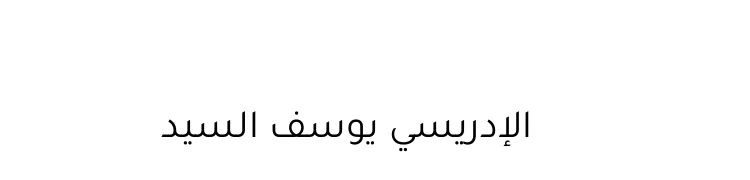 | ✓ Yes | ✓ Yes | ✓ Yes | ✗ No | Download |
| PDF24 Looks right, but it is saved as a picture: nothing to search or copy. |  | ✗ No | ✓ Yes | ✓ Yes | ✓ Yes | Download |
| PdfBayt Looks right, but it is saved as a picture: nothing to search or copy. | 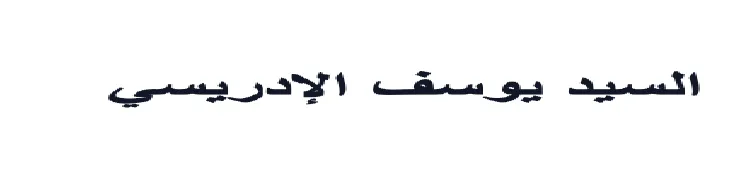 | ✗ No | ✓ Yes | ✓ Yes | ✓ Yes | Download |
| Smallpdf Kept two of the three words, with the letters unjoined and backwards. | 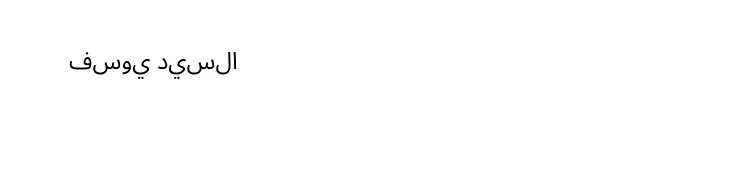 | ✓ Yes | ✗ No | ✗ No | ✗ No | Download |
Not tested, in their own words
- iLovePDF: “The Content Editor does not currently support Right-to-Left (RTL) languages.”
- Sejda: “Right to left scripts are not fully supported (eg: Arabic, Hebrew)”
Arabic OCR: reading a scanned letter
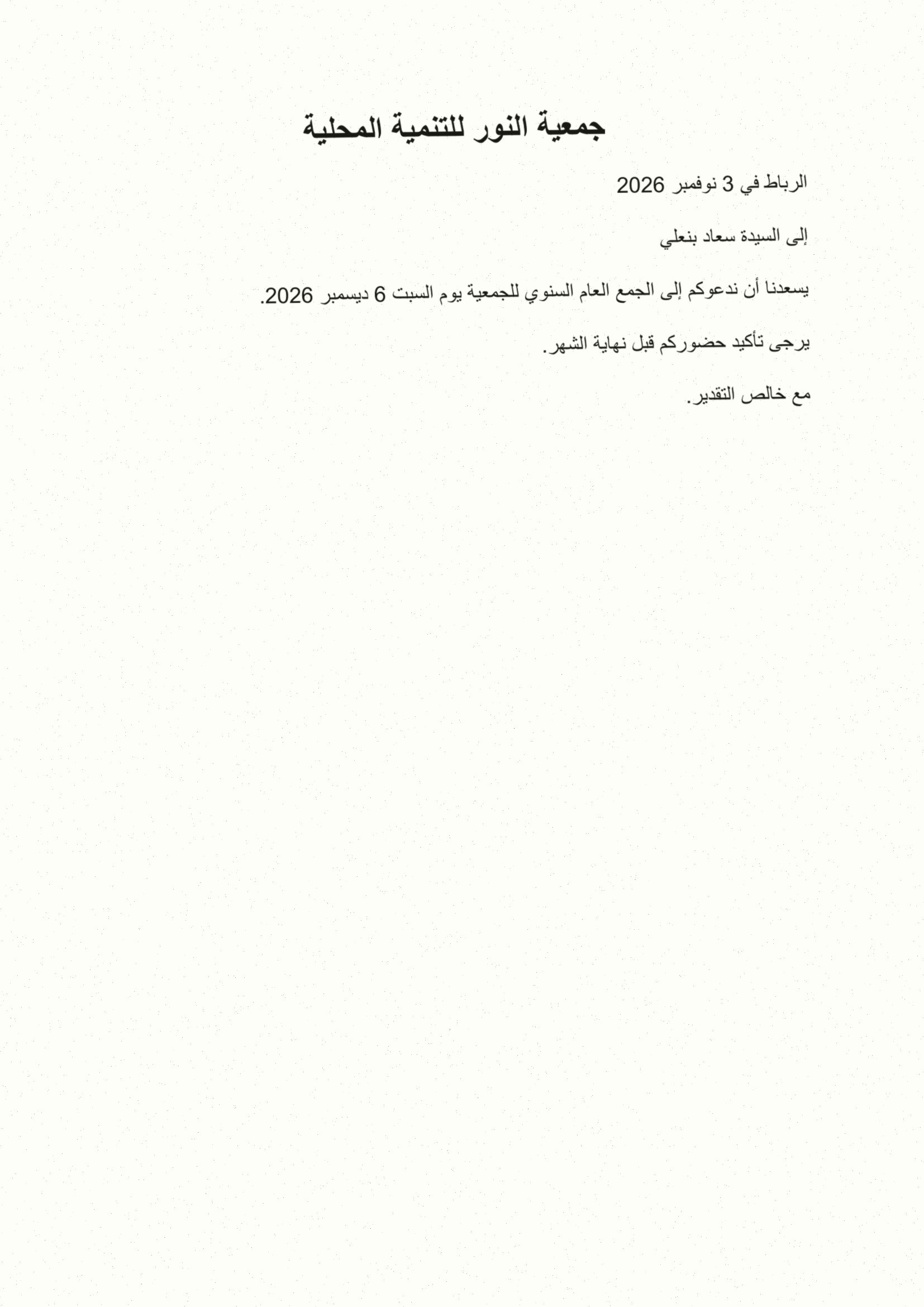
The third test: a scanned Arabic letter (our test letter printed, tilted, blurred and speckled by script, so every tool gets the same scan). Each tool ran with Arabic selected. We count the letter’s words found as written, and word pairs that come out in the right order.
Tested on 19 November 2026, free tier, no account.
| Converter | Words found (of 31) | Word pairs in order (of 25) | What you get back | What happened | Word file |
|---|---|---|---|---|---|
| BlendPDF | 31 | 25 | Searchable PDF | Every word, in order, in a searchable PDF. | Download |
| imagetotext.info | 31 | 25 | Text only | Every word, in order. Text only: no PDF back. | Download |
| PDFCandy | 28 | 23 | Text only | Most words right. Text only: no PDF back. | Download |
| PDF24 | 27 | 21 | Searchable PDF | Most words right, in a searchable PDF. | Download |
| iLovePDF | 0 | 0 | Searchable PDF | The text layer holds letter-shape codes with words run together: search finds nothing. | Download |
No Arabic OCR at all
- Sejda: Arabic is not in its OCR language list (58 languages, Persian and Hebrew included).
- PdfBayt: No OCR tool among its tools.
The scan we used:scan-letter.pdfscan-letter.jpgcheck-ocr.py
What are “fake letters”?
Arabic letters change shape depending on their place in a word. This memo, saved by Word for Mac, stores each shape as a separate drawing code (Unicode “presentation forms”), and some of them are Persian codes.
A converter that copies those codes into Word gives you a document that looks fine. But search for «الموظفين» and Word finds nothing; paste a line into WhatsApp or Google and it breaks; screen readers can’t read it. A good converter turns the shapes back into the 28 letters.
Where we lose
On a clean PDF made by LibreOffice, the others do better than us: our Word file moves the numbers within two of the six lines. We’re fixing it, and it stays on this page until we have.
| Converter | Lines as written (of 6) | Word file |
|---|---|---|
| PDF24 | 6 | Download |
| iLovePDF | 5 | Download |
| BlendPDF | 4 | Download |
How we tested
- Input: 03-word-tahoma.pdf from our Arabic test set (CC BY 4.0), a six-line memo, 33 words.
- Each converter: its free web page in Chrome, default settings, no account, the downloaded file kept as is (Sejda gave a .doc; we opened it with macOS textutil to check it).
- Check: check-docx.py reads the Word file’s text and counts the memo’s words found exactly as written, and the presentation-form code points left. Anyone can run it on these files.
03-word-tahoma.pdf02-libreoffice-arial.pdfcheck-docx.pycases.json
We run it again every week
Converters change. We rerun this test weekly and update the date and the scores. If a tool fixes Arabic, it moves up the table.
Convert your own Arabic PDF to WordThink a result is wrong? Send the file you got to contact@blendpdf.com and we’ll recheck and correct this page.